Coffee geek experiment bench

Tweak the variable. Evolve the recipe.

Not a coffee guide. Not a check-in app. An experiment bench for people who tweak parameters — and want to know which change actually mattered.

A/B experimentsRecipe forkingBLE scale dataFlow rate curves
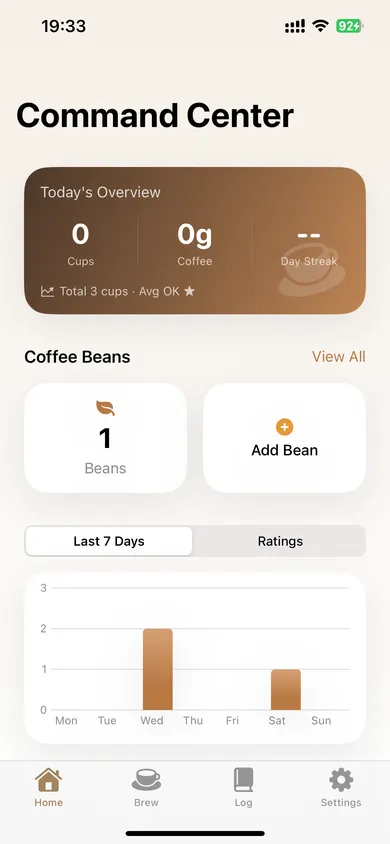
BrewTinker home dashboard
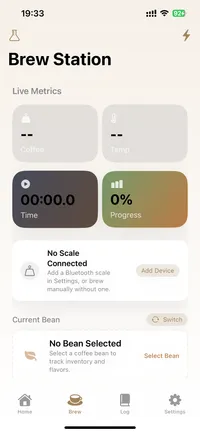
BrewTinker brew session screen

Real app surfaces

Inside the app

Five core tabs plus widgets cover the main workflow.

Workflow map

How the five tabs split responsibility

Home surfaces stats and experiments, Brewing handles BLE scales and A/B tests, Beans tracks inventory and freshness, Logs support retrieval and export, Settings holds devices, sync, and privacy.

01 · Home

Real tab

Today stats, active experiment return, trends, insights, and task reminders.

02 · Brewing

Real tab

BLE scale streaming, quick brew, guided sessions, espresso dial-in, recipe library, and A/B experiment setup.

03 · Beans

Real tab

Full bean profiles, inventory tracking with auto-deduction, freshness countdown, and optional photos.

04 · Logs

Real tab

Search, filters, heatmap, sensory scores, and batch export to JSON/CSV/PDF/text.

Home → Brewing → Beans → Logs, with Settings holding the system layer

Five tabs, each with a clear job. Widgets and Dynamic Island extend the workflow outside the app.

01 Home

Today, experiment, trends

  • Today card
  • Active experiment
  • Insight grid + tasks
02 Brewing

Live workspace and recipe actions

  • Quick brew + BLE auto-dose
  • Guided brew + A/B
  • Espresso Dial-In
03 Beans

Inventory, freshness, profiles

  • Auto-deduction on save
  • Freshness tracking
  • Low-stock alerts
04 Logs

Searchable records and heatmap

  • Search + date filters
  • Sensory radar scores
  • Single or batch export
05 Settings

Devices, sync, privacy, widgets

  • BLE management
  • Optional sign-in + sync
  • Privacy controls

The experiment loop

Built for people who run experiments

This app assumes you already know what you're doing. It systematizes your experiment workflow — it doesn't teach you how to brew.

Full data chain

Core capabilities from the experiment workflow: BLE data capture, controlled variable testing, recipe evolution, and full export portability.

Scale

BLE scale streaming with flow rate

Acaia, Timemore, and compatible scales. Weight + flow rate, live.

A/B

2–5 variant experiments on 6 variables

Temperature, grind, dose, water, ratio, time. Side-by-side comparison after each run.

Recipes

Every tweak gets a version number

Parent link, changelog, full history. Fork a recipe, evolve it, trace decisions back.

Espresso

Dial-in with extraction feedback

Dose/yield/time in, extraction assessment and adjustment suggestions out.

Guided

Immersive step-by-step brewing

Phase timing, live scale overlay, Dynamic Island on lock screen.

Export

JSON / CSV / PDF / text

Single or batch. No paywall. Your data, always portable.

Scale

BLE scale streaming with flow rate

Acaia, Timemore, and compatible scales. Weight + flow rate, live.

A/B

2–5 variant experiments on 6 variables

Temperature, grind, dose, water, ratio, time. Side-by-side comparison after each run.

Recipes

Every tweak gets a version number

Parent link, changelog, full history. Fork a recipe, evolve it, trace decisions back.

Espresso

Dial-in with extraction feedback

Dose/yield/time in, extraction assessment and adjustment suggestions out.

Guided

Immersive step-by-step brewing

Phase timing, live scale overlay, Dynamic Island on lock screen.

Export

JSON / CSV / PDF / text

Single or batch. No paywall. Your data, always portable.

FAQ

Common Questions

This public site only describes capabilities that are verified in the app and supporting documentation.

How do I add a brew record? +

Open the Log tab and tap the add button in the top-right corner. You can also save a brew directly after finishing Quick Brew or Guided Brew.

How do I run an A/B experiment? +

Start from the Brew tab, choose Experiment, then keep all variables the same except the one you want to compare. BrewTinker will save each round and show the results side by side.

How does cloud sync work? +

Data Sync uses a local-first model. Your brews stay available on device, and signed-in users can manually sync or enable auto-sync from Settings > Data Sync.

What devices can it connect to? +

The current supported device families are Acaia scales, Timemore scales, and Inkbird thermometers. Actual compatibility can still vary by model, firmware, and iOS environment.

What can I export? +

You can export individual brews as text, PDF, image, or JSON, and batch export brew history as CSV, JSON, or text. No subscription required.

How do I delete my account? +

Open Settings, tap your profile, scroll to the danger zone, and choose Delete Account. BrewTinker will ask for a recent sign-in before removing cloud and local data.

Support

Still need something specific?

Contact [email protected]

Ready to experiment

Run your next experiment.

BLE scale data in, versioned recipe out. Download, run one real session, and decide from actual workflow fit.

iPhone app5 languagesNo paywall

Get started

The product is the iPhone app

Download, connect your BLE scale, run one real A/B session, and decide from actual workflow fit.

Get started

Your data stays portable

JSON, CSV, PDF, plaintext export. Local-first storage. Cloud sync is optional, not required.

Get started

Privacy is a first-class control

Analytics opt-in, crash reporting opt-out, no paywall on exports. Read the privacy policy before you decide.

Home screen preview
Overview
Brew screen preview
Brew flow
Log screen preview
Records